n8n vs Make comes down to the workflow you need and the person who will maintain it. For a small team connecting everyday business apps, I would shortlist Make first. For a technical team that needs custom logic or a self-hosted deployment, I would shortlist n8n. Both support visual automation, code and AI; neither is the best choice for every business.
The biggest practical difference is how you count usage. Paid n8n plans meter production workflow executions. Make uses credits, with consumption depending on the modules and data being processed. A lower headline subscription does not tell you what your particular automation will cost.
n8n vs Make: the quick decision
- Start with Make if a nontechnical colleague will maintain mostly standard app connections and you want managed hosting.
- Start with n8n if deployment control, more involved data transformations or a developer-owned workflow are central requirements.
- Compare both on the same process if cost is the deciding factor. Count records, repeated actions, AI usage and recovery work before comparing plans.
- Choose a hosted service if nobody can own server updates, backups and incident response. n8n Cloud is also an option here.
| Decision point | n8n | Make |
|---|---|---|
| What you build | A workflow made of connected nodes | A scenario made of connected modules |
| Main paid usage unit | Production workflow execution | Credit; consumption varies by module and activity |
| Hosting | Cloud service or self-hosting | Managed cloud platform |
| Custom code | JavaScript and Python, with environment-specific restrictions | JavaScript and Python through Make Code on paid plans |
| AI workflows | Models, tools and other workflow nodes | AI modules and Make AI Agents, currently in open beta |
| My first shortlist | Developer-led or deployment-sensitive projects | Business-app automation with a nontechnical operator |
The sections below explain these differences and link the relevant vendor documentation. The shortlist is a starting point: a missing connector action or a required team permission can reverse the decision.
1. n8n vs Make pricing: compare the allowances
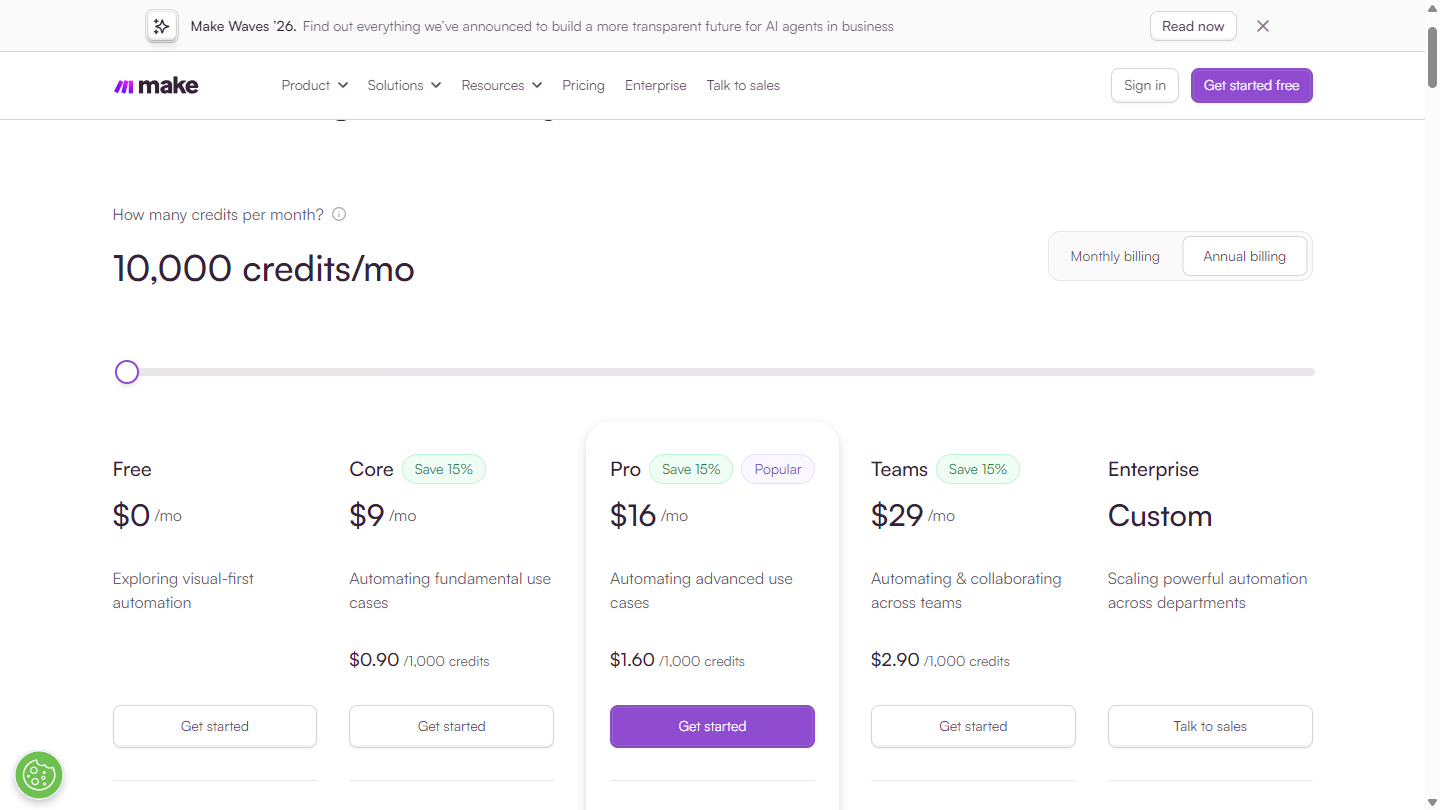
These are the entry-level and mid-tier options displayed during this review. Paid prices below are monthly equivalents with annual billing selected, not month-to-month quotes. The vendors display different currencies; no exchange-rate conversion or tax estimate is assumed.
| Plan | Displayed price | Included usage |
|---|---|---|
| n8n Starter | €20/month, billed annually | 2,500 executions per month |
| n8n Pro | €50/month, billed annually | 10,000 executions per month |
| Make Free | $0 | 1,000 credits per month |
| Make Core | $9/month, annual billing | 10,000-credit monthly allowance selected |
| Make Pro | $16/month, annual billing | 10,000-credit monthly allowance selected |
Sources: n8n pricing and Make pricing. These are selected configurations, not equivalent bundles of features. In particular, Make Pro at $16 is a different plan from Core; it should not be described as simply buying more Core credits.
For your budget, add four lines: the platform subscription, external AI or API usage, any hosting costs, and maintenance time. A workflow that saves thirty minutes but requires frequent repair may be a poor investment regardless of the software price.
2. Executions versus credits: the billing difference that matters
In n8n, an execution is one workflow run. Adding more steps inside that run does not automatically create more billable executions. Its paid quotas count production executions; manual editor runs are excluded. A scheduled trigger counts when it fires, whereas a polling trigger counts when it finds new data. See n8n’s execution rules.
In Make, an operation describes module activity and a credit is the billing unit. Most ordinary, non-AI operations use one credit, but that rule does not cover every module. AI, file processing and code can use different charging rules. Check Make’s credit documentation for the modules you actually intend to use.
A transparent 1,000-event example
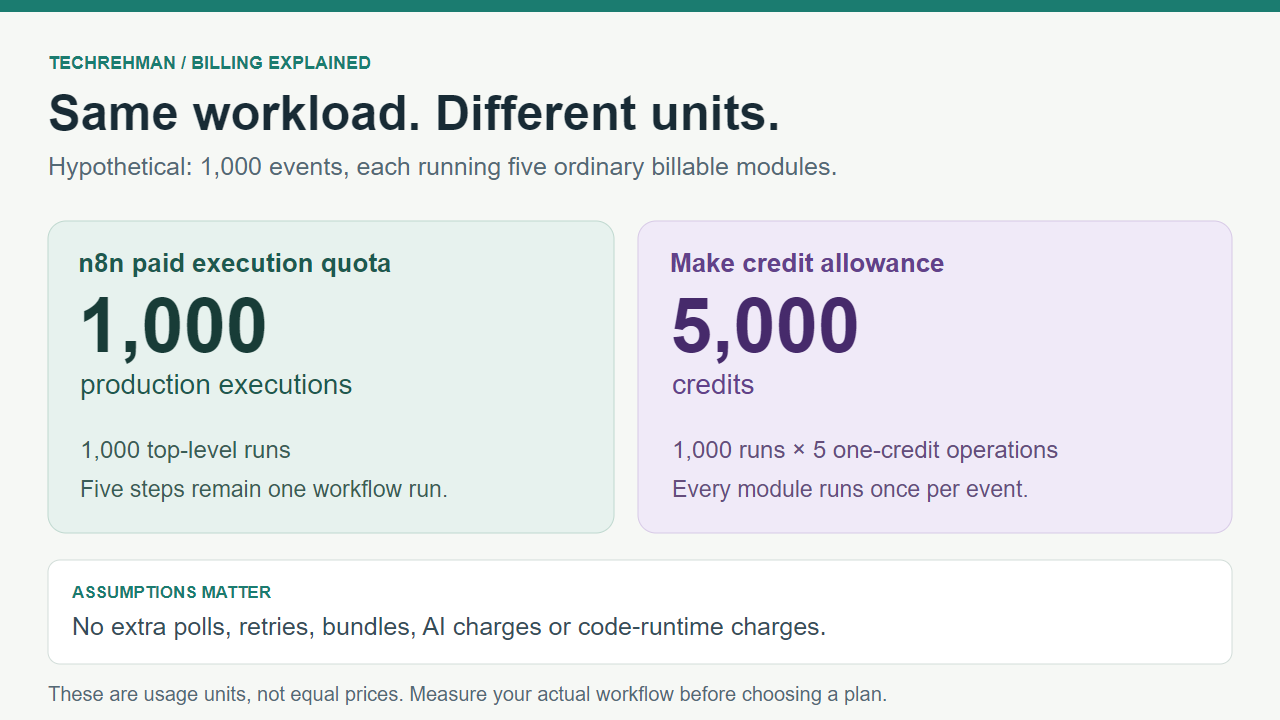
Imagine 1,000 incoming events during a month. Each starts one top-level n8n workflow. The equivalent Make scenario performs exactly five billable module operations per event, each charged at one credit. Count the trigger within those five operations if it is billable; do not silently add it as a sixth step.
- n8n: 1,000 production runs = 1,000 executions.
- Make: 1,000 events × 5 one-credit operations = 5,000 credits.
This hypothetical excludes extra polling checks, retries, additional bundles, AI charges and code-runtime charges. It illustrates different units, not a claim that one costs five times as much. Those usage totals fit the Starter and Core allowances shown above, but the plans still need to meet your other requirements.
Why the number of records changes the calculation
Make passes data in bundles. One trigger operation can return several bundles, and a downstream module can run for each one. For example, one trigger returning ten contacts followed by two actions per contact produces 1 + 10 + 10 = 21 operations, assuming that exact path. An empty polling check can also consume an operation. The operations guide explains this distinction.
For a fair n8n vs Make estimate, draw the busy path through your process. Include ten attachments rather than one, repeat requests and a failed third-party service. Then inspect actual usage during a small pilot instead of multiplying only the boxes visible on the canvas.
3. n8n vs Make for integrations and custom code
Both products use visual builders. My preference for Make as an initial small-business shortlist comes from its app-centered scenario approach, not a measured claim that every beginner learns it faster. Someone comfortable with structured data and APIs may prefer n8n immediately.
Connector counts are a weak buying shortcut. Before choosing either platform, write down the exact action: “find a customer by email and update the existing record,” for example. An integration that can only create customers does not satisfy that requirement.
Also check the data coming back. Does a search return one match or a list? Can a missing field be distinguished from an empty value? Which account owns the connection? These questions affect reliability more than how attractive the workflow diagram looks.
Make can run JavaScript and Python
Calling Make a platform with no coding capability is outdated. The Make Code app supports JavaScript and Python on paid plans. Its documented charge is two credits per second of code execution. Runtime resources and library options depend on the plan.
For instance, a short script can normalize messy text before a CRM update. Keep the input and output contract clear so a colleague can troubleshoot the surrounding visual scenario without reverse-engineering a large program.
n8n’s code environment depends on hosting
The n8n Code node also supports JavaScript and Python. However, an arbitrary package that runs on your laptop is not automatically available in n8n Cloud. Self-hosted deployments have additional configuration options for dependencies and runners. Check the documented restrictions for your chosen environment before planning a library-heavy transformation.
In either tool, use a code step when it makes a rule easier to express and maintain. Do not bury a whole business process inside one script merely because the platform permits it.
4. n8n vs Make for AI workflows
n8n combines AI components with ordinary workflow nodes. Its official AI documentation covers model providers, tools and memory. That makes it a candidate for processes where a model interprets information and the surrounding workflow controls what happens next.
Make also offers AI modules and Make AI Agents. The current agent product is in open beta, so features and pricing may change. Make’s AI Provider is available across plans; connecting your own provider to that agent feature requires a paid plan.
A useful design for either platform is: receive a request, classify it, validate the result, then route it. For example, AI might identify whether a customer wants a quote or a booking. Fixed rules should check the required fields and permitted destination before anything updates a live business system.
Use an agent when choosing the next step requires judgment. If the process always follows a known sequence, an ordinary workflow with a single AI extraction step may be easier to inspect and budget. This is a design recommendation, not a claim that one platform’s model is more accurate.
Keep model costs separate. Make’s connection and credit rules distinguish its AI Provider from your own provider connection, where you can pay the provider separately for tokens. For any setup, record who bills for the model, which model is selected and how much context each request sends.
If your starting point is a phone call, our AI voice agent guide explains the conversational layer. An automation platform can support downstream tasks, but it should not be mistaken for a complete telephone service simply because it offers AI nodes.
5. Self-hosting, data control and the n8n license
The strongest architectural distinction in n8n vs Make is the option to operate n8n yourself. Its self-hosting documentation describes deployments on infrastructure you manage. You can also use n8n Cloud if you want its workflow builder without taking on that operational role.
Make’s on-premise agent is an Enterprise feature that connects scenarios to supported local-network services. It is a bridge to those services, not an installation of the entire Make platform on your own server.
Free software does not mean free operation
n8n Community Edition is available without a subscription, but its feature list excludes some collaboration and governance capabilities, including projects, workflow and credential sharing, SSO and Git-based version control. Check the exact requirement before assuming a free deployment replaces a paid team plan.
Its code is source-available under the Sustainable Use License, with separate terms for enterprise components. The license text permits internal business and personal uses within its terms; it is not unrestricted open-source licensing. If your business would resell hosted access or embed the platform for customers, check that specific arrangement with n8n.
Operationally, assign someone to updates, access control, monitoring and recovery. The backup documentation explains why workflow exports alone are not a complete instance backup. Credential restoration depends on the encryption key, and databases and any external storage need appropriate protection.
Self-hosting also does not automatically keep every piece of information on your server. If a workflow sends a document to an external AI provider or a cloud CRM, that data leaves the deployment. Map those destinations before deciding whether a hosting arrangement fits your privacy requirements.
6. n8n vs Make error recovery: beyond the demo
In n8n, you can configure an error workflow to respond to failed executions. This provides a separate place to define a notification or other failure response. You still need to decide what the recipient should do and which failures require urgent attention.
Make offers error handlers such as Retry, Skip and Resume. Their effects differ: skipping an invalid bundle is not the same as saving it for recovery. Rollback applies to modules that support transactions; it is not a universal undo for every external action.
Consider a hypothetical CRM request that succeeds but whose response times out. Retrying it blindly could create a duplicate. A safer design might attach a stable event identifier and check whether that event was already processed before creating another record. The exact method depends on the destination API.
For each important automation, document three things: who receives the failure alert, where the unfinished work is visible, and how to resume safely. Test a missing field, expired connection and temporary outage in a controlled pilot. A green success indicator alone does not prove that the intended business outcome happened.
This is especially useful for customer-facing processes. Our AI receptionist buying guide discusses transferring calls to a person; the same principle applies to the automation behind it. A person should have enough context to complete the request when the automated path stops.
7. How to choose n8n vs Make for your business
Use one representative process as a trial, such as qualifying a website inquiry and placing it in the right follow-up queue. Keep customer-sensitive information out of early experiments; sample records are enough to reveal many design problems.
- Define the outcome. Write the trigger, required fields and final action in plain English. Agree on what counts as a successful result.
- Check the exact integrations. Confirm the needed trigger and action, account permissions and any external API limits.
- Try five input cases. Include a normal request, missing data, a duplicate, multiple records and an unavailable destination.
- Measure the billable work. Record executions or credits alongside AI-provider usage. Include repeated branches and recovery attempts.
- Hand it to the future operator. Ask them to find a failed run, explain it and resume it from written instructions.
For a small business with standard app connections and no server administrator, my initial recommendation is Make. For a developer-led team that needs a self-hosting option or substantial custom logic, it is n8n. If you like n8n but cannot own infrastructure, evaluate its hosted plans rather than forcing a self-hosted setup.
The useful outcome of an n8n vs Make comparison is a maintainable automation with a predictable budget. Choose the tool your actual operator can diagnose, not the one that wins the longest feature list.
Frequently asked questions
Can I move a workflow from one platform to the other?
Plan for a rebuild and validation rather than assuming an export will transfer every connection and rule. Before committing, keep a platform-independent description of your input fields, decisions, destination actions and failure handling. That gives you a specification to work from if you later migrate.
Should a beginner learn APIs before using either tool?
You can start with built-in connectors. Learn enough to recognize authentication, requests, responses and rate limits when the process needs a custom connection. It is more useful to understand one real data flow than to write code before you have a task for it.
How should I estimate usage when I do not know monthly volume?
Build low, expected and busy-month estimates. Count incoming events and the average number of records per event separately. During a pilot, compare observed usage with those assumptions, then leave room for growth and recovery work instead of buying against an exact best-case estimate.
What should I ask a freelancer who builds my workflows?
Ask who owns the accounts, where credentials are stored, what is included in maintenance and how failures are reported. Request a short operating guide and a handover demonstration using a failed example. A workflow you cannot inspect or maintain remains dependent on its original builder.


Join the conversation
0 approved commentsAsk a question, share a useful experience or suggest a correction. Keep it constructive. Comments are reviewed before publication.